After accepting the specification file name, Facets asks if you want to include "Extra Specifications"?
For most analyses, type nothing. Merely click "OK".
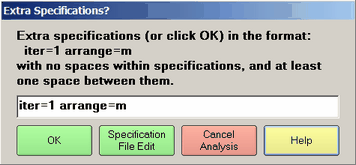
This figure shows an example of two other specifications "iter=1" and "arrange=m". These will be processed along with the specification file, e.g., essays.txt, and take precedence over any similar specifications in it.
No spaces within specifications. If the text is red, then spaces have been found.
(Specification box) |
type in Specification=value with no internal blanks. Multiple Specification=value Specification=value must be separated by a blank. |
OK |
accepts the extra specifications for processing and repeats them in the Facets window. |
Specification File Edit |
opens the specification file in a NotePad Edit window so it can be viewed or edited |
Cancel Analysis |
this Facets analysis is canceled |
Help |
displays this Help page |

