After regular reporting has completed, you are encouraged to explore your output using the pull-down menus. We will display them from left to right. Click on "Files" ...
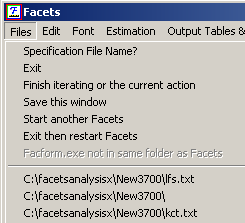
Specification File Name? (also Ctrl+O)- click on this to start an analysis, or click on the specification file name in the list.
Exit stops Facets immediately, same as clicking on x in top-right corner of window.
Finish iteration (also Ctrl+F) forces the estimation procedure to halt at the end of the current iteration and move into the fit calculation and reporting phases.
Save this window progress report (Ctrl+S) writes the screen output to a text file.
Start another Facets launches another copy of Facets, leaving the currently running analysis active.
Facform launches the Facform data-formatter. Facform helps construct specification and data files, but these can also be constructed directly by hand, or by means of SAS, EXCEL etc.
Restart: facets (filename) launches another Facets analysis with the stated specification file
Exit, then Restart: facets (filename) stops the current analysis and launches another Facets analysis with the stated specification file.
C:\facetsanalysisx\New3700\lfs.txt - Names of specification files are added to the bottom of the menu. Click on these when you want to start an analysis quickly.
C:\facetsanalysisx\New3700\ - - Names of folders are added to the bottom of the menu. Click on these when you want to locate a file quickly.

