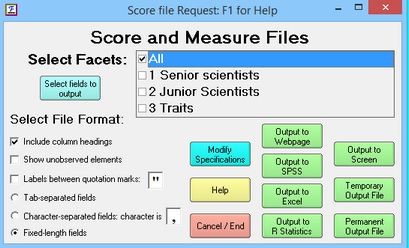
Output Dialog Buttons |
|||
Select Facets check the box for the facets you want in the output file(s). |
Modify Specifications - provides more formatting options. Some choices can also be preset using Edit Initial Settings. |
Output to Webpage uses your web browser to display a sortable table containing the output file |
Output to Screen - writes the output file to the analysis window (generally slow) |
Select fields to output lets you choose which fields you want to display |
Output to SPSS - writes the output as an SPSS .sav file to the specified file. SPSS-formatted files include the facet number, and also the facet label if element labels are specified. |
Temporary Output File - writes the output files to temporary text files (generally quickly) |
|
Select File Format to match the output you want and that works |
Cancel/End - exits from this Dialog without any further action. |
Output to Excel - writes the output files with one Excel temporary workbook for each facet. If Excel files do not display. |
Permanent Output File - writes the output files to permanent text files. The file name builds on the specified name. |
Output to R Statistics - writes the output file to a .rdata file and launches R. |
|||
Output to Excel, SPSS or Word
When Facets does not support direct output, then see export to Excel, SPSS and Word.
