The "Output Files" menu allows you to output the measures after the analysis is completed. These files are in addition to those generated in the main run. They are put into separate files or displayed on your screen.
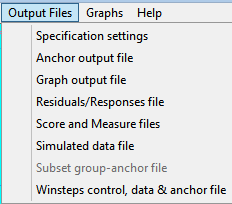
Specification settings file: list of the settings of all specifications
Anchor output file: the original specification file, but with the measure estimates included as anchor values for all elements.
Graph output file: the coordinates for plotting probability curves
Residuals/Responses output file: the response-level data and statistics
Score output file: element scores and measures
Simulated data file: response-level data simulated to match the empirical data
Subset group-anchor file: This assists with resolving ambiguities in the measurement frame of reference due to subset disconnection. It is only active when this type of problem exists, e.g., with example file subsets.txt
Winsteps control & data file: output the Facets data in a format compatible with Winsteps®
These output files include those produced automatically from the main analysis, but with more options, e.g., SPSS format output.

