Facets exits immediately when:
You click on the top right  box.
box.
You select "Exit" on Files drop-down menu.
If there are open output windows when Facets exits, it asks:
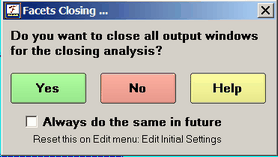
Yes: the output windows are closed.
No: the output windows are left open.
Help: displays this page
Always do the same in future: make this the default action. It can be changed in Edit Initial Settings.
Facets terminates processing immediately when
1) errors are found in the specification file
2) the data do not match the specifications
3) you press Ctrl+C to force immediate termination.
Only partial output will be produced, but this may be helpful in diagnosing problems in the analysis.
Facets terminates its estimation phase at the end of the current iteration when
4) convergence is reached in estimation
5) the maximum number of iterations have been performed
6) you press Ctrl+F to stop the iteration process or press the ►► button.
Full results will be produced. Their value depends on how finely converged the estimates are. Check that the final set of values in the iteration table are all small. You may alter the convergence= criteria in order to obtain a faster, rougher, convergence or a more accurate, slower, convergence to the iterative estimation procedure. See also "My analysis does not converge."

