Winsteps uses a text editor to display and edit control files, data files, Tables and output files. The default editor is NotePad. You can change to another editor, such as WordPad or TextPad in Edit Initial Settings.
To make permanent (default) changes in NotePad font face and/or size: |
|
|---|---|
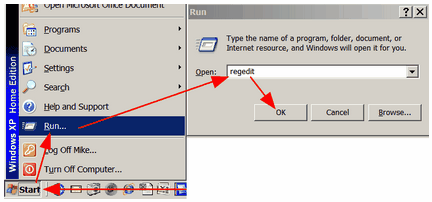
Windows "Start" Click on "Run" Type in "regedit" Click on "OK" |
|
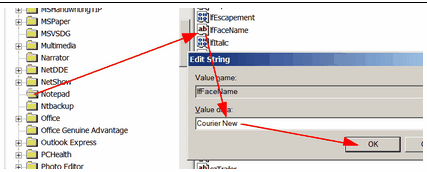
Registry Editor: Click on the + in front of "HKEY_CURRENT_USER" Click on the + in front of "Software" Click on the + in front of "Microsoft" Click on "Notepad" For the type face: Double-click on "IfFaceName" Type in "Courier New" Click on "OK" |
|
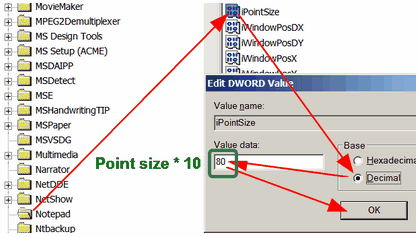
For the font size: Double-click on "iPointSize" Click on "Decimal" Type in 80 (for point-size 8 multiplied by 10) Double-click on "IfFaceName" Click on "OK"
Close registry Click on top right |
|