Facets Rasch software: update history
| There is no Java in Winsteps, Facets, nor their installation software |
Windows: Facets 4.1 is 64-bit software. It runs successfully under Windows 7, 8, 10, 11, Vista, (but not XP, 2000, ME, NT, 98, 95, 3.1,)
Mac, Linux,Chrome OS: Facets is 64-bit Windows software with some 32-bit modules. Please see www.winsteps.com/mac.htm for how to run 32-bit Windows software on your computer.
For bug reports and work-arounds, see problems.htm
| Facets is transitioning from 32-bit to 64-bit Windows software |
|---|
Facets/Minifac 64-bit (2023) runs on Windows 11, 10, 8, 7, Vista with complete functionality.
For Windows XP, request 32-bit Facets/Minifac 3.87.0. For earlier Windows, request earlier Facets. |
| 64-bit-compatible components in 64-bit Facets | 32-bit components continue correctly in 64-bit Facets |
|---|
- Installation software (by download)
- Analysis module ("Facets"/"Minifac" app launch)
- Example files (Examples folder)
- Help files (Help menu)
- Input from Facets specification and data text files, back to 1986. (Files menu)
- Output to text files, web pages, Word docs (Output Tables menu, Output Files menu)
- Output to Excel plots (Plots menu)
- Output to R Statistics files, plots and graphs (Output Files menu, Plots menu)
- Fonts (Fonts menu)
- Batch mode (BATCH=)
- Graphs window 64-bit (Graphs menu: Enhanced)
|
- Graphs window 32-bit (Graphs menu: Standard)
- Input formatter for Excel, R Statistics, SAS, SPSS, Stata, Text data files (Data=)
- Output to Excel files, scatter plots and other plots (Output Files menu, Plots menu)
- Output to SPSS files (Output Files menu)
- Facform data formatter
|
| Facets 4.1 (64-bit) and Facets 3.87 (32-bit) produce the same output in the same amount of time.
|
Update procedure: When an update is released, all license holders are notified by email. For those eligible for free updates (within one year of original purchase or two years of renewal), the email contains an update download URL and an installation password.
All licensees receive at least one free update.
Facets Licensees: To request updates, please email mike@winsteps.com
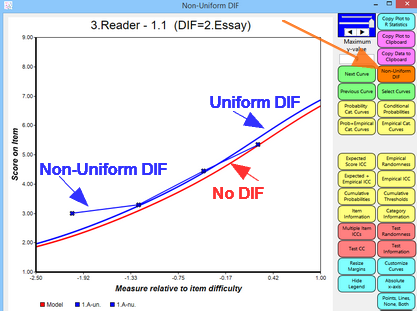
Facets Uniform and Non-Uniform DIF/bias/interaction graph |
Facets 64-bit 4.1.6, 4.1.4 4-15-2024, 4.1.3 3-15-2024, 4.1.2 2-15-2024, 4.1.0 1-15-2024, 4.0.0 11-15-2023
- 4.1.6 Bug fix: Last line of specifications or data sometimes omitted
- 4.1.5 Bug fix: Tab-separated output files missing minus signs
- 4.1.4 Bug fix: No longer throws an F27 for data lines with no ratings but all facet elements
- 4.1.4 Bug fix: No longer throws F34 for Unix LFs (non-DOS end-of-line codes)
- 4.1.4 Bug fix: No longer outputs HTML showing charcodes such as 9247; and nbsp;
- 4.1.4 Bug fix: Remembers "Extra specifications?" setting in Edit Initial Settings dialog box
- 4.1.4 Bug fix: Corrected facet list in score file dialog box
- 4.1.4 Bug fix: Corrected Vertical= and Yardstick= in Table 6 dialog box
- 4.1.3 Enhancement: Uniform and Non-Uniform DIf/Bias/Interaction Graphs in the Enhanced graphing module
- 4.1.3 Important Bug fix: datafile problems and last line of data omitted if it does not have an end-of-line code
- 4.1.3 Important Bug fix: some subsetting of the data not detected
- 4.1.3 Bug fix: sometimes crashed drawing menus
- 4.1.3 Bug fix: stray "*" now ignored in Specification file
- 4.1.2 Bug fix: incomplete read of Excel input file
- 4.1.2 Bug fix: blank message box on launch
- 4.1.2 Bug fix: Output Files menu: Graph Output dialog box: headings corrected
- 4.1.2 Enhancement: Output Tables menu: Webpage x-y plot: faster display with file Winsteps.js
- 4.1.2 Enhancement: Facets analysis window: more responsive to user input due to threading
- 4.1.1 Bug fix: Output Tables menu: Table 14 output corrected
- 4.1.0 Enhancement: Models= and Rating scale=, "H" hides (does not show) unobserved categories in Table 8, e.g., Models=?,?,?,R50H when ratings are 0,10,...
- 4.1.0 Enhancement: Output Tables and Plots menu: Generalizability Theory: R Statistics: performs a G-Theory analysis using R Statistics package "gtheory"
- 4.1.0 Enhancement: Example specification and data files: for gtheory: Brennan.3.2, Rajaratnam.2, for judging plans: Minimal-Judging-Plan.txt
- 4.1.0 Released 64-bit version of Facets
- 4.0.0 Enhancement: Tables and Plots Menu: R Statistics plots: x-y, x-y-z, histogram
- 4.0.0 Enhancement: Tables and Plots Menu: Webpage plot: x-y
- 4.0.0 Continuity: 64-bit developed from 32-bit 3.87.0. Measure estimates and fit statistics are the same
- 4.0.0 Enhancement: 64-bit software
Facets 32-bit 3.87.0 11-15-2023
- 3.87.0 Enhancement active since Facets 3.80.0: TABLES=001011... controls output of Tables 1 to 14.
- 3.87.0 Bug fix: Graphs menu: crash when selecting "Scales"
Facets 3.86.0 7-15-2023
- 3.86.0 Enhancement: Output Files menu: Graphfile, Residualfile, Score file Output as sortable webtables displayed with your web browser
- 3.86.0 Bug fix: T7LGS=, Table 7 subtable selection, malfunctioned
Facets 3.85.1 1-15-2023; 3.85.0 11-17-2022
- 3.85.1 Simplification: Graphs menu: 3 options for the Graph Window: original window (internal to Facets), standard window (Winsteps 32-bit), enhanced window (Winsteps 64-bit)
- 3.85.1 Enhancement: in Enhanced Graph module: Customize Curves button enables curves to be removed from a graph and
their colors changed. Customize Curves.
- 3.85.0 Enhancement: Graphs menu: Original graphing by rating scales, and Enhanced graphing by element within facet, where possible
Facets 3.84.2 10-1-2023; 3.84.1 10-12-2022; 3.84.0 5-10-2022
- 3.84.2 Enhancement: Original, Standard (32-bit) and Enhanced (64-bit) Graphs menu and window
- 3.84.1 Enhancement: T7LGS= selects Table 7 measure tables: L = list of elements, G = Group reports, S = Group summary reports
- 3.84.1 Enhancement: Table 6.1: facets may be omitted from Table 6.1 rulers because all of its elements have the same measure.
Then below Table 6.1: "Facet omitted because all elements have the same measure. Use Vertical= to force display"
- 3.84.1 Bug fix: Labels=, target element, now correctly actioned to change element number in the data to another element number
- 3.84.0 Enhancement/Bug fix: Table 5 Global Pearson chi-squared test: degrees of freedom were sometimes obviously incorrect. d.f. now calculated by counting (estimable data points - free parameters)
- 3.84.0 Enhancement: warning message for data weighted zero or negatively: these data are ignored
- 3.84.0 Bug fix: Data=: element ranges, such as 1-10, processed correctly when facet has X in Models=
- 3.84.0 Bug fix: error messages: line number reference changed to "at or near" line number
- 3.84.0 Bug fix: element labels "D" and "E" were incorrectly parsed as floating point numbers
- 3.84.0 Bug fix: corrected "Facets failed 42720 subscript out of range"
Facets 3.83.6 3-15-2021; 3.83.5 1-15-2021; 3.83.4 11-14-2020; 3.83.3 7-13-2020; 3.83.2 4-7-2020; 3.83.1 3-10-2020; 3.83.0 11-14-2019
- 3.83.6 Bug fix: Crash when outputting Table for Binomial Trials or Poisson rating scales
- 3.83.5 Enhancement: for big files, now reports the count of observations input so far at the end of each line of .... in the Analysis window.
..................... 107891
- 3.83.5 Bug fix: Left=Yes and Table 7: Table 7, the measure table, was slightly misformatted when the element labels were output to the left of the statistics.
- 3.83.5 Bug fix: Analysis window: "Invalid use of null" crash when copying from the analysis window.
- 3.83.4 Enhancement: Table 5 option to compute Pearson Chi-squared degrees of freedom: Pearsondf=Yes. Time-consuming for large datasets.
- 3.83.4 Enhancement: Scorefile= Field Selection Box: option to put element number first on the left side of the output data line
- 3.83.4 Bug fix: Table 5 overflow failure for large datasets
- 3.83.4 Bug fix: Table 14 now displays "No pairwise terms" when there are none available to report
- 3.83.4 Bug fix: Warning (10) "No elements in facet" message was displayed when not approriate
- 3.83.3 Enhancement: Table 4 unexpected responses. Sequence number of observation in data file added.
- 3.83.3 Enhancement: Table 8 logit displacements shown for Anchored or not-converged thresholds
- 3.83.3 Enhancement: Table 8 Andrich threshold values displayed for Binomial Trials and Poisson Counts models
- 3.83.3 Enhancement: Table 8 - heading "Steps" changed to "Thresh" (Andrich Thresholds)
- 3.83.3 Enhancement: Table 13, 14 dialog box: report bias/interaction for only one element
- 3.83.3 Enhancement: Reversedscoring = No for asymmetric scoring of reversed facets
- 3.83.3 Enhancement: Residual/Response file: includes Most Probable Category (MPCat) for the observation
- 3.83.3 Bug fix: Table 8 - tweak to Binomial Trials/Poisson Count threshold estimation
- 3.83.3 Bug fix: Residual file: blank element numbers now reported as the null element number
- 3.83.3 Bug fix: Output Files menu: Winsteps file: "out of memory"
- 3.83.3 Bug fix: Data file: close data file if an error
- 3.83.2 Enhancement / Bug fix: Graphfile=, Residualfile=, Scorefile=, Output Files menu: File formats actioned: Excel *.xls, R Statistics *.rdata, SPSS *.sav
- 3.83.2 Enhancement: Models= facet code "@" for facets that are only referenced in Dvalues=, but are not used for measurement.
- 3.83.2 Enhancement: Table 4 unexpected observations: now has sequence number of observation in data
- 3.83.2 Revision: Table 5 global chi-squared - now Pearson with d.f. by simulation
- 3.83.2 Bug fix: CSV= only applies to text files
- 3.83.2 Bug fix: permanent score files not deleted
- 3.83.1 Enhancement and bug fix: omit Labels= and Facets will create the full list of element labels in Table 2.
- 3.83.0 Enhancement: Output Files menu: Graph file, Residual file, Score file: all output to R Statistics (new), Text, Excel, SPSS
- 3.83.0 Enhancement: Output Files menu: "Specification settings" output current settings of all Facets specifications
- 3.83.0 Enhancement: Residual file: column headings: E1, E2, .. for the element numbers, M1, M2, ... for the element measures
- 3.83.0 Bug fix: Data=: data from R statistics .rdata file. Sometimes R Statistics not found, though installed
Facets 3.82.3 10-16-2019; 3.82.2 09-02-2019; 3.82.1 08-15-2019; 3.82.0 08-14-2019
- 3.82.3 UTF8encoded = Yes/No/? allows user to specify the encoding of the specification and data files
- 3.82.3 UTF8substitute = "." specifies the character to replace a UTF-8 character, when that character cannot be displayed
- 3.82.3 Bug fix: Residualfile= field selection now works for SPSS files
- 3.82.3 Bug fix: Crash when processing Korean element labels
- 3.82.3 Bug fix: Crash when constructing large Winsteps control and datafiles
- 3.82.2 Bug fix: Occasional crash reading files
- 3.82.1 Bug fix: Failure with multiple Rating Scale= instructions
- Enhancement: Chinese UTF-8 and other multi-byte characters in specification and output files: BOM allowed but not required
- Enhancement: Mac and UNIX end-of-line codes allowed: CR, LF, CRLF, LFCR
- Enhancement: Table 14: extreme scores indicated with >
- Enhancement: Table 14: can be produced from main analysis with many pairwise terms
- Enhancement: data values can be in quotes: 1 2 "3"
- Enhancement: UTF8sub= allows choice of substitute character when multibyte UTF-8 cannot be displayed
Facets 3.81.0 10-12-2018, 3.81.1 11-5-2018, 3.81.2 2-14-2019
- 3.81.2 Enhancement: Output Files, Subset File: identify each element with only one subset for group-anchoring
- 3.81.1 Bug fix: Table 14 bias/interaction: correction to computation for Welch degrees of freedom
- 3.81.1 Enhancement: Tables 13, 14 bias/interaction: extreme scores for groups indicated by "<" (extreme: minimum possible) and ">" (extreme: maximum possible)
- Enhancement: Scorefile= includes Infit and Outfit chi-squares, d.f., and probabilities, together with mean-squares
- Enhancement: Boxshow=No removes boxes from around Tables, making Tables easier to import into Excel, etc.
- Enhancement: Models=, Labels=, Data=: fractional weights, such as 1/3 instead of 0.333, makes weighting more exact
- Enhancement: Data=, remove " " and ' ' from data simplifying using element labels in data
- Bug fix: Table 13, 14: correction to bias estimates for locally extreme scores
- Bug fix: Specification file, Data file: better detection of invalid input file formats (Unicode, RTF, etc.)
- Bug fixes/adjustments: minor annoyances and malfunctions corrected
Facets 3.80.1 7-27-2017 + 3.80.2 9-26-2017 + 3.80.3 10-30-2017 + 3.80.4 3-10-2018
- Bug fix: failure outputting files in SPSS format
- Bug fix: some "Check" messages written twice to ouput file
- Bug fix 3.80.2: infinite loop with _ in element labels. (Work around for earlier Facets: replace _ with -)
- Bug fix 3.80.3: incorrect expiry data in 3.80.2
- Bug fix 3.80.4: occasional crash when drawing graphs
- Bug fix 3.80.4: incorrect formatting of Table 8 for unobserved categories
- Bug fix 3.80.4: STATA versions after 13 not supports. In STATA: . saveold filename13, version(13)
Facets 3.80.0 3-15-2017.
- Enhancement: Tables=000010001 to select Tables to output from main analysis
- Enhancement: Output Tables menu: Table 5 added as an option
- Enhancement: Score file= "Sign" column: 1 for positive facets, -1 for negative-oriented facets
- Enhancement: Table 7: Orientation of measure shown by "+" or "-" above "Measure" in Table 7 headings
- Enhancement: Table 8: intermediate category with zero count with "Keep" has infinite threshold shown as "infin." - approximated by ≈40 in the Anchorfile= output file
- Workaround: Group-anchoring. If all elements in a group have extreme scores, then they are reported as "Unmeasureable". To report measures, add dummy data for those elements with very small weights to make data measureable.
- Informative: Anchorfile= output file: "Group anchor this facet and/or the other facets (please experiment to see what works):"
- Informative: DIF tables: "Welch" replaced by "Rasch-Welch"
- Informative: Output Warning (3)! This is NOT referenced by a Model= specification
- Bug fix: Analysis window: avoid occasional failure in a color-selection routine shown as "Invalid use of null"
- Bug fix: Labels= specificatio: When too many elements (millions!) appear to be specified, now reported as Error Code 77.
- Bug fix: Output Tables: very small chi-square values now reported as .0
- Bug fix: Score file= "Displace" - displacement oriented to match facet, so unanchored measured is (anchored measure+displacement)
- Bug fix: Specification: Interrater = rater facet, agreement facet, agreement facet, ..... now matches facets correctly
- Bug fix: Table 2: "List of unspecified elements" - when Facets detected unidentified elements in one facet, it sometimes reported unidentified elements in other facets incorrectly.
Facets 3.71.4 1-22-2014.
- Enhancement: Anchor output file. List thresholds: ; Rasch-Andrich Thresholds = 0,-1.0,-0.5, 1.5
- Bug fix: display Warning 3 for unused, but specified, rating scales.
- Bug fix: overflow when loading observations for Interrater=, "Facets 3.71.3 failed at Facets-42300 : 6 Overflow"
- Bug fix: random restart of Facets after clicking on Cancel in message box
Facets 3.71.3 9-15-2013.
- Bug fix: at iteration 100 estimates may diverge
- Bug fix: Excel interface sometimes fails when plotting (winexcel.exe)
- Bug fix: Failure in subset detection: "Facets 3.71.2 failed at Facets 60570:6 overflow."
- Bug fix: Self-consistent subset numbering in all output
- Enhancement: Subsets=List: disjoint element listing in Table 6, but no subset rulers
- Enhancement: Warning (16) when element 0 appears to be active, but Keepasnull = 0
- Enhancement: Desktop shortcut is "Facets Rasch"
Facets 3.71.2 5-29-2013.
- Bug fix/speed-up: corrections/improvements to "Inter-rater agreement" computation
- Bug fix/speed-up: corrections/improvements to "Validating subset connection" algorithm
- Bug fix/speed-up: prevent excessive dots on screen
- Bug fix: "SPSS interface: SPSS work file incorrect" message caused by faulty version of winspssg.exe
- Bug fix: prevent crash if Ctrl+F during subset detection
- Bug fix: again for undefined elements in an element range in the data. Example: here is a specification and data file:
Title = "1-36 Bug in 3.71.1"
Facets=2
Models=?,?,B6
Usort=1,2
Unexpected=0
Labels=
1, Person
1-2
*
2, Item
; 1-3 commented out
4-6
*
Data=
1, 1-6, 1,2,3,4,5,6 ; only items 4-6 are active
2, 1-6, 6,5,4,3,2,1

Table 4.1 Unexpected Responses
+-----------------------+
|3.71.1|3.71.2|         |
| Wrong| Right|         |
| Cat  | Cat  | N F N F |
|------+------+---------|
|  2   |  4   | 1 1 4 4 | <- Wrong starts at datapoint 2. Right starts at datapoint 4.
|  3   |  5   | 1 1 5 5 |
|  4   |  6   | 1 1 6 6 |
|  5   |  3   | 2 2 4 4 |
|  4   |  2   | 2 2 5 5 |
|  3   |  1   | 2 2 6 6 |
+-----------------------+
- Minor enhancement: Replication character= allows change of data replication character from R to user-selected character, e.g., #
www.winsteps.com/facetman/replication.htm
- Minor enhancement: FacetsPasswordInstall.exe amended to support silent (passive) installations
www.winsteps.com/facetman/silent.htm
Facets 3.71.1 5-1-2013. download is shown as Facets371.exe
- Bug fix: for undefined elements in an element range in the data. Example: here is a specification and data file:
Title = "Bug in Facets 3.71.0"
Facets = 1
Models=?,R6
Labels=
1, Facet
1-2 ; deliberately omit elements 3 and 4
*
Data=
1-4,1,2,3,4  ; observations 3 and 4 are for undefined elements, so should be ignored
4,1          ; ignored
1,0          ; valid
1-2,0,0      ; valid

; On analysis screen, these messages display in 3.71.0, but should not:
; Check (2)? Invalid datum location: 2,2 in line 9. Datum "2" is too big or not a positive integer, treated as missing.
; Check (2)? Invalid datum location: 2,3 in line 9. Datum "3" is too big or not a positive integer, treated as missing.

; Table 7.1.1  Facet Measurement Report.
;    Correct in 3.71.1             Bug in 3.71.0
; +---------------------------++-----------------
; |  Score   Count  | N Facet ||  Score   Count
; |-----------------+---------||-----------------
; |     1       3   | 1 1     ||     1       3
; |     2       2   | 2 2     ||     9       4  - includes observations "3" and "4" which should be ignored
Facets 3.71.0 4-23-2013
- Enhancement: Labels=: observations for one element can be merged with elements for another element number: 1=Element,,,,4 ; observations for element 1 are assigned to element 4
- Enhancement: Center=: option to include elements with extreme scores in centering computation for a facet: Center=1Z ; facet 1 is centered, the mean measure of its elements is zero, including extreme scores
- Enhancement: Table 7: Reliabilities with and without extreme scores
- Enhancement: Inter-rater=: the facets used to match for inter-rater agreement can be specified, Interater=3,4,6
- Minor enhancement: Graphs window: make probability-graph x-axes symmetric, if reasonable
- Minor Enhancement: Scorefile=. Columnheading "Fair.Avge" now "FairMAvge" or "FairZavge"
- Minor Enhancement: Scorefile= and Omitunobserved=No: Report all elements defined in Labels=, including elements not active in this analysis
- Minor Enhancement: Output Files menu: Subset-group-anchor file: improved allocation of elements to anchoring groups
- Minor Enhancement: Output Files menu: Winsteps-formatted file: option for no data (useful if only anchor values are wanted)
- Minor Enhancement: SE=Real allowed, as well as Standard=Enlarged
- Minor Enhancement: Table 6 and Omitunobserved=No: anchored elements without observations are shown.
- Minor Enhancement: Table 7 and Omitunobserved=No: anchored elements without observations are shown.
- Minor enhancement: Table 7: columns spaced to ease importing table into Excel (Data, Text-to-columns)
- Minor enhancement: Table 8: column of Total counts of each category,
- Bug fix: Analysis window: progress dots (...) were sometimes excessive
- Bug fix: Bias analysis: improved checking for memory overload (leading to crashes) with too many bias terms
- Bug fix: Delements=: "Subscript out of range" when element references in the data are to element labels.
- Bug fix: Dvalues=: incorrect operation with multiple Dvalues= specifications and an element range in one facet
- Bug fix: Error messages: incorrect line numbers in error messages with included files: %include
- Bug fix: Estimation menu: internal timer functions while the Estimation menu is active
- Bug fix: Keepzero= or Null=: report error (instead of crashing) when Keepzero= or Null= value out of range: -1 to 2147483647
- Bug fix: Labels=: improved checking for memory overload (leading to crashes) with too many element labels
- Bug fix: Output file and Specification file: improved detection if output file attempts to overwrite the specification file
- Bug fix: Output Files menu: Scorefile=: corrected selection of output files
- Bug fix: Output Files menu: Scorefile=: prevent automatic deletion of Scorefile= permanent files
- Bug fix: Subset detection: "Subsets O.K." incorrectly reported in Analysis window for some data designs.
- Bug fix: Table 6: sort problem in rulers can cause a crash on "top" or "bottom"
- Bug fix: Table 7: corrected point-correlations and inter-rater agreements when element-weighting is used in Labels=. (Model-weighting and "R" replication-weighting are correct).
- Bug fix: Table 7: fixed-effects chi-square value reported if exceeds 1,000,000 instead of "??.?"
- Security enhancement: Address Space Layout Randomisation (ASLR) and Data Execution Prevention (DEP)
- Security enhancement: Known publisher using COMODO Code Signing
Facets 3.70.1 7-5-2012 - the download is labeled 3700, not 3701
- Bug fix: incomplete anchor output files when original specification file included; "Data = filename"
- Bug fix: incorrect computation of Total Score and Total Count in rare, extreme situations
- Bug fix: if last observation is missing with tabbed data, it is reported as "Error F30: Not enough responses for the range: deficit: 1"
- Bug fix: when an element is unspecified, sometimes the wrong element is reported as the unspecified one
Facets 3.70.0 6-26-2012
Major Enhancements:
- Enhancement: Data file: %filename includes files containing additional data
- Enhancement: Files menu: most-recently-used folders speed selection of specification files
- Enhancement: Specifications: Delements= gives better control over whether element identifiers in the data are element numbers (=N) or element laberls (=L) or both (=LN or =NL)
- Enhancement: Specifications: %filename includes files containing additional specifications or data
- Enhancement: Specifications: Rating Scale=: recode a range to a category, such as 4-20 to category 2, and 4.0-4.9 to category 4.
- Enhancement: Specifications: User-friendly rescaling of measures simplified with Uscale= and Udecimals=
Tweaks:
- Tweak: Analysis window: "Directory" changed to "Folder"
- Tweak: Estimation menu: Newton-Raphson: clicking on OK immediately resumes estimation
- Tweak: Estimation: increased precision of computations can change the number of iterations to reach convergence
- Tweak: Estimation: anchor values skipped when checking convergence
- Tweak: Residual file: changed heading from "Logit" to "Measure" to allow for user-scaling (Umean=)
- Tweak: Residual file: measures displayed with user-scaling applied (Umean=)
- Tweak: Score file - decimal places for measure, S.E. and displacement set by Udecimals=
- Tweak: Specifications: Arrange=(nothing) suppresses output of Tables 7 and 14
- Tweak: Specifications: multiple data files allowed: Data = filename + filename + ... (or use included files: %filename)
- Tweak: Table 13: "Observed Average" score reported with two decimal places
- Tweak: Table 7: "Observed Average" score reported with two decimal places
- Tweak: Table 8: report "Used" as integers if no decimal weights
- Tweak: Table 8: show dichotomous anchor values (used for pivot anchoring)
Bug fixes
- Bug fix: Anchor file: eliminate stray "-1" in Rating Scale= definition
- Bug fix: Anchor file: includes Dvalues= specification
- Bug fix: Anchor file: Labels=, include group-numbers, if any
- Bug fix: Anchor file: rating scale thresholds output as starting values when no anchoring specified
- Bug fix: Data file: prevent overflow if there are more than 32676 element labels in Labels= to match with element identifiers in the data
- Bug fix: Estimation: no "Stop" message when estimates go out of range
- Bug fix: Estimation: prevent program hang due to internal timer conflicts
- Bug fix: Input and Output Files: correct processing of files in folders with suffixes in their folder names, e.g., c:\facets.folder\examples\exam0.txt
- Bug fix: Specifications: Labels=: prevent crash due to out-of-range facet number (bigger than Facets=)
- Bug fix: Specifications: prevent crash when matching element identifiers in Data= with elements in Labels=
- Bug fix: Subset detection: prevent when there are unassigned datapoints but all assigned datapoints are in one subset.
- Bug fix: Table 2: all invalid data values displayed
- Bug fix: Table 2: more accurate count of blank data lines.
- Bug fix: Table 7: omit Groups= table when not in Arrange=
- Bug fix: Table 7: Reliability computation. Corrected to always report 0.0 when the "true" variance is 0.0
- Bug fix: Table 8: more precise computation of "Expected Average Measure" and "Outfit Mean-Square" statistics for categories
- Bug fix: Tables 13, 14 and Excel Plots: DIF and DPF sizes in user-scaled units (UMEAN=)
- Bug fix: Tables 13, 14 and Excel Plots: correction to plotted points to match Tables 13 and 14
- Bug fix: Temporary work folder: robust against changes in Windows settings
- Bug fix: Winsteps control file output: correct datacodes in CODES=
Facets 3.69.0 - 5-1-2011 - limited release
Facets 3.68.0 - 6-5-2011, 3.68.1 - 7-27-2011
- Bug fix (late): Help "search" tab does not work
- Enhancement: (3.68.1): include element measures in residual file
- Bug fix: (3.68.1): corrected the failure to close all text windows when "Yes" clicked on exit
- Bug fix: (3.68.1): corrected computation of some Fair Average values
- Bug fix: (3.68.1): corrected Interrater=: memory overflow if more than 32,000 observations
- Bug fix: (3.68.1): corrected SPSS formatter: index out of range
- Bug fix: (3.68.1): do not report missing elements for ignored "X" facet
- Enhancement: allow data files bigger than 2GB (tested to 250,000,000 observations)
- Enhancement: increased precision of estimation to support bigger data files.
- Enhancement: faster processing when there are unspecified elements
- Enhancement: faster processing when element identifiers are element labels
- Enhancement: more flexibility for element identifiers that are part of element labels: Delements=
- Enhancement: weighting of elements supported. In Labels=
element number = element label, anchor value, group number, weight
- Enhancement: T4maximum = 0 suppresses Table 4, list of unexpected observations
- Enhancement: accomodate change to R-statistics version 2.12 folders
- Enhancement: Table 6 "rulers": SL displays full rating-scale category label from Rating-scale=
- Bug fix: corrected: Table 2, Labels=Build, now only reports unspecified elements in modeled facets
- Bug fix: corrected: program failure due to Entered= inconsistency
- Bug fix: corrected: program failure due to overflow in discrimination-estimation routine
- Bug fix: corrected: program failure due to overflow in estimate-out-of-range routine
- Bug fix: corrected: Table 8 rating-scale report: very large Observed-Expected residuals not displayed
Facets 3.67.1 - 11-1-2010
- Enhancement: Table 7: Group summary report
- Enhancement: Group labeling: glabels=
- Enhancement: Residual file:
columns for response status, and logit displacement (equivalent to score residual)
- Bug fix: Dummy "D" anchoring sometimes ignored
- Bug fix: Unhelpful "invalid group number" error message
- Bug fix: Table 7: Missing edit word for unusual status messages
- Bug fix: Table 7 with paired comparisons ?,-?: shows correct total score and observed average.
- Bug fix: Incorrect "Observed-Expected Average" in Table 14, 10th column
- Bug fix: Calculator causes crash under Windows 7
Facets 3.67.0 - 6-20-2010
- Enhancement: Table 7: show group-number column in measure reports.
- Enhancement: Table 7: Group summary report
- Enhancement: Labels= G or X for group anchoring: G include measures with extreme scores; X exclude measures with extreme scores
- Enhancement: remove redundant headings before Table 7 total lines
- Enhancement: "Output Files menu", "Specification Settings" shows current values of specifications
- Enhancement: Table 7 - if only one element, then only one arrangement shown
- Enhancement: Labels= specifies that group number of an element is in the element label
- Enhancement: Dvalues= the element number of one facet is the group number of the element in another facet
- Enhancement: Help menu - link to report bugs
- Enhancement: Anchorfile= Anchor files - improved formatting
- Bug fix: correct reporting of Data=file+file+....
- Bug fix: correct handling of duplicate Data= when there is Data= followed by data.
- Bug fix: Labels= Dummy facet. Specified anchor values are now over-ridden by the Umean= value
- Bug fix: Labels= Multiple definitions of an element are now correctly combined.
Facets 3.66.3 - 4-11-2010
- Bug fix: overflow with huge element numbers, bigger than 2147483647
- Bug fix: SPSS output .sav file formatting failure for point-biserial correlations
Facets 3.66.2 - 3-1-2010
- Bug fix: computation of "Approximate degrees of freedom"
- Bug fix: better matching of element labels containing underscores: "_"
- Bug fix: make sure that a temporary work folder is available (permissions problem)
Facets 3.66.1 - 11-1-2009
- Bug fix: estimation malfunction with message: "Warning (14)! Estimation diverged"
Facets 3.66.0 - 10-21-2009
- Complete details and pictures of 20 enhancements and bug-fixes at Facets 3.66.0 PDF
- Facets window launches normal size (not maximized)
- Welch's corrected t-test for bias/interaction significance
- R-statistics-format data files accepted
- Bug fix: Model=?,?,?,R malfunctioned as Model =,,,R on some (Asian) Unicode computers. Model=$,$,$,R now allowed.
- Minor changes and bug-fixes to improve appearance, operation and documentation
Facets 3.65.1 - 4-28-2009
- Usort= now sorts based on rounded printed values (not exact values) in Table 4
- "Analyzed in time of ..." always shown in Facets Analysis window
- Corrected: screen lines print in wrong colors under some conditions
- Corrected: very small model variances for observations caused "divide by zero" errors
- Corrected: "return without gosub" error if no point-biserials computable
- Corrected: "degrees of freedom" in Table 5 incorrectly reported number of free parameters
- Corrected: "divide by zero" error if iteration interrupted
- Corrected: plotting corrected for Excel 2007 with big DIF plots
- Corrected: SPSS open file failure under some conditions
- Corrected: don't overwrite Windows systems files with later versions (can crash Windows 2000)
- Corrected: don't write output file if Facets is cancelled in the Output file dialog
Facets 3.65.0 - 4-13-2009
- Complete details and pictures of 35 enhancements and bug-fixes at Facets 3.65.0 PDF
- Element labels (as well as element numbers) allowed in data file
- Element label list built from element labels in data file
- Reliability "Strata" reported = (4*Separation + 1)/3
- % Variance explained by Rasch measures reported
- Minor changes and bug-fixes to improve appearance, operation and documentation
Microsoft 12-2008
- Security update for modules that are used in Winsteps, Facets, Ministep, Minifac, Bond&FoxSteps
- This is in addition to the Windows Update.
- Please be sure that your anti-virus software is active and up-to-date.
- Please perform the cumulative security update (10MB) from Microsoft:
https://support.microsoft.com/kb/957924/
Facets 3.64.0 - 6-18-2008
- Complete details and pictures of 27 enhancements and bug-fixes at Facets 3.64.0 PDF
- Point-measure correlation and its expectation
- Compatible with Excel 2007 .xlsx data files
- Totalscore=Yes is now the default
- Table 13 DIF now shown with d.f. and probability
- "Partial Credit" items can be graphed with relative or absolute measures
- Minor changes to improve appearance, operation and documentation
Facets 3.63.0 - 1-2-2008
- Complete details and pictures at Facets 3.63.0 PDF
- Faster convergence (around two iterations through the data less)
- Direct data input from SAS, SPSS, STATA as well as Excel
- ASCII=Y or N or W: to output prettier tables with line-drawing characters
- Windows Vista-compatible: installation and Help display
- Table 5 summary statistics: report with two decimals (one decimal previously)
- Table 6 bug fix: on column selection for the "rulers"
- Explicit "D" code in Labels= for dummy facets
- T3onscreen=, Tables=, T8NBC= for more control over production and display of Output Tables
- Residual output file: field selection
- Anchor file: with all current specification settings
- Graphing: option to display Legends
- Graphing bug: empirical category and option frequencies displayed correctly
- Minor changes to improve appearance and operation
Facets 3.62.0 - 6-12-2007
- Rating scale= ,,, recode, recount ; has a bug in Facets 3.62
- Complete details and pictures at Facets 3.62.0 PDF
- Excel Bias/Interaction Plots:Absolute measures (baseline + bias/interaction), Relative bias measures (bias only relative to overall), Relative bias t-value (significance relative to overall), Pairwise measure bias differences and significances, Average observed rating
- Output score files to SPSS and to Excel
- Output residual files to Excel and SPSS
- Faster analysis (disk input-output and screen writes)
- Control buttons in Facets main Window:"Pause/Resume" and "Finish iterating" buttons
- Bigger datasets: Facets has successfully analyzed datasets with 500,000 elements and 100,000,000 data points
- Barcharts=: no, most important, all
- Labels=: Explicit dummy facet code, "D"Anchors all the starting values at 0
- Models= ?,?,?,R8KModels specification: Addition of "K" to indicate that intermediate unobserved categories are to be kept in the category hierarchy
- Tables=: Suppress Table Output from the main analysis - use the pull-down menus instead
- T4max=: Specify maximum number of residuals to be reported in Table 4.
- Vertical=SL displays the category labels in Table 6Vertical= 1C displays a count of the element numbers in Table 6
- Yardstick=: location of extreme elements (at end or by measure), end is the default
- Edit initial settings:Option for computation of empirical curves. Computation can take a long time if dataset is large.Option for displaying iteration bars. Iterations can slow down some Unicode versions of Windows.
- Short-cut keys: revised model-checking short-cut keys to remove conflicts with Windows defaults
- Short-cut keys: All short-cut keys documented
- Font menu - to simplify changing display fonts in Facets Window
- Edit Template from Edit menu streamlined
- Cancel button merely exits from current dialog box. Facets remains active.
- Files menu: More options on program launch
- Iteration progress bar: shown in color.Multiple ==== are written in one operation to prevent writing to the screen slowing down the computation.
- Facets Window: Red for warning messages
- Facets Window: only most unconverged elements shown to speed up screen display output.Largest score residualLargest score residual percentLargest logit change
- Bias/Interaction dialog box: Better control over bias/interaction Tables and Excel plots from Output Tables menu
- Modify specifications dialog box: Change facet positive and negative orientation (Positive=, Negative=)Change standard error reported, model or real (SE=)Bug fix: Umean= and Uscale= malfunction.Now accessed from all Table dialog boxes
- Table 14: more than 1000 pairwise comparisons. Please request explicitly from the Output Tables menu due to memory and speed constraints.
- Table 2: Unobserved models not reported
- Table 2: Rating scales listed in order
- Table 4. Standardized Residual: 1 decimal place
- Table 6:Vertical=SL displays the category labelsVertical= 1C displays a count of the element numbers
- Table 6: Non-extreme categories shown next to extreme categories
- Table 6: Rating scale identification below rulers
- Table 6: Fewer overflow lines
- Table 6.0.0: Improved subset reporting
- Table 6.1: Rescaling of numerical bar charts for consistency across facets
- Table 13: Bias/interaction direction reported explicitly
- Table 13: Facets names in bias/interaction report
- Table 14: Heading shortened:
- Graph file: headings and range
- Typographical error "xstop" to "stop"
- Bias sign inconsistencies:always: positive / negative resolved:Bias= only for Tables 12 and 13.
- PROX estimation: Don't estimate the rating-scale structure during PROX: it proved detrimental
- Data file message: Corrected instructional message:Data file not found - please re-enter
- Stop statement: Unexpected, very rare, program stop removed. Now Facets always exits gracefully.
- Undefined facet: Table 7 on the Output Tables menu no longer crashes if there is an undefined facet.
- Real standard error: Documentation corrected for the Real S.E.
- Subset detection: further unusual designs correctly diagnosed
Facets 3.61.1 - 7-4-2006 (roughly matches Bond&FoxFacets, Bond & Fox, 2edn.)
- Bug fix: input from Excel 2002 & 2003 spreadsheets (winexcel.exe interface routine)
Facets 3.61.0 - 5-10-2006
- Enhanced: Total score (includes extremes) option: Totalscore=Yes
- Enhanced: reliabilites reported based on both model and real standard errors
- Enhanced: Excel plots - better chart names. more robust version: please report Excel problems - but first see Excel problems.
- Enhanced: inter-rater agreement: omit self-agreements when one rater rates same situation several times
- Precaution: process hex code "A0" as blank
- Precaution: set option selection windows topmost temporarily
- Precaution: detect invalid model weights: reports Error 60
- Precaution: detect non-numeric element labels in data: reports Error 23
- Precaution: Dvalues=: imputes "*" at end of specification list, if needed
- Precaution: Dvalues=: imputes facet count, if Dvalues= specified before Facets=
- Help: How to construct score-to-measure tables
- Help: Error codes updated
Winsteps+Facets small CD-ROM |
- 3.60.0 1-2006 Very minor bug fixes: Close window on top. Consistent numbering of subsets. Definitely does not run on Windows 3.1 nor 95.
- 3.59.0 11-2005 Output of Winsteps-compatible control and data files. Residual-percent on iteration report.
- 3.58.0 8-2005 Defaults: usort=u, bias=ability. Table 7: more reliability summary statistics. Table 14: target listed first.
Excel data file: columns allowed to right of responses. Miscellaneous minor reporting enhancements and minor bug fixes. Has a "subscript" bug in processing Dvalues=
- 3.57.0 4-2005 Graphs: smoothing of empirical curves. Graph of item randomness.
Added control variables: Negative= opposite of Positive=. Centered= opposite of Noncentered=
- 3.56.1 3-2005 fix progam failure when reporting disconnected subsets
- 3.56.0 2-2005 correct the estimation of unanchored steps when some steps are anchored,
Table 8 - display without Umean=, Table 8 - correct horizontal displacement of graphs,
Graphs: empirical ICC and empirical category probabilities.
- 3.55.1 1-12-2005 late binding of Excel to make Excel-version independent; allow more than 32,000 iterations; exit/restart corrected
- 3.55.0 1-2005 Excel bias plots, DVALUES= in labels; Change of unexpected on screen; Font on main screen - change if selected;
correct examples: pt-biserial=y; correct Minifac "readme"; Observed score in Table 14; Bias direction example in Help File;
numeric overflow counting data records; no extra information prompt option; correction to group number display;
link 16000 subsets; fix overflow problem in barcharts; tested with 10,000,000 observations AND 200,000 elements
- 3.54.2 11-2004 Table 4 input form correction
- 3.54.1 10-2004 Graph background color user-settable. Runs under Windows 98. All output Files and Tables on Output menu. Umean= set from Output menu. More output file format options. Better access to template file.
- 3.54 9-2004 Table 4 and Specifications on output menu. Corrections to umean/uscale for interactions.
- 3.53 9-2004 Graphs of empirical ICCs shown with upper and lower confidence bands. Subset resolution by means of "subset" menu entry. Data simulation.
- 3.52 7-2004 Dvalues= for constant data facets: "Close output window" prompt: correction to "unspecified element" count: Scale name in Table 7 instead of "S.1"
- 3.51 6-2004 Make "Real" fit statistic match Winsteps, and RMT.
- 3.50 4-2004 Read in Excel data files directly. All output files from pull-down menu. Improved Query=y processing. Corrected values for extreme observations in residual file.
- 3.49 1-2004 Empirical ICCs, Query=Yes now XP compatible, more decimal places in fit computations, bias/interactions added to post-analysis pull-down menus.
- 3.48 10-2003 Score files from pull-down menu. Graphs: binomial, Poisson and title correction.
- 3.47 9-2003 Discrimination estimates. More output from pull-down menus.
- 3.46 8-2003 Graphs under Windows 2000 and XP
- 3.45.2 6-10-2003 Table 6.0.0 Disjoint subset listing to output file, not screen
6-04-2003 correction to point-biserial with weights or replications
- 3.45.1 4-28-2003 Windows compatibility and Ctrl+C copy of screen text
- 3.45 4-12-2003 Correction to default file locations; some tables also by Tables menu; additions to Edit menu
- 3.44 3-5-2003 Bug correction for more than 32000 elements in facet. Remove category residual convergence rule.
- 3.43 1-24-2003 Table 14 pairwise bias/interaction report
- 3.42 1-6-2003 Most-recently-used files in "Files" menu
- 3.41.2 12-10-2002 Minor additions to program User Manual. Interrater: observed and expected agreement per rater.
- 3.41.1 11-25-2002 Overcome Text Editor problem with some customized versions of Windows 2000
Improve Inter-rater agreement %: observed and expected;
- 3.41 11-1-2002 Correction to Poisson discrimination computation;
Inter-rater agreement %: observed and expected;
improved disconnected subsets detection with group anchoring;
fix bug in "exit and restart".
- 3.40 8-7-2002 Exact agreement percent for inter-rater=. Example kcta.sd added.
- 3.39 7-1-2002 Colorize the graphs
- 3.38 3-13-2002 "Graph menu" of Category probability curves etc.
- 3.37.1 - 2-13-2002 Show multiple digit expected scores on Table 7 ogive.
- 3.37 - 11-01-2002 Distribution by Winsteps.com, no longer MESA Press
- 3.36.4 - 6-22-2001 Show "Facets" not "Form1" on task bar.
- 3.35 & 3.36 - 3-19-2001 Miscellaneous minor bugs. Improve convergence.
- 3.34 - 1-28-2001 - Bugs with very large analyses.
- 3.33 - 10-27-2000 - Tabs in specifications treated as blanks.
Greater Windows-NT compatibility. Kernel32 fix.
Faster convergence.
- 3.32 - 9-4-2000 - Speed-up and bug-fixes.
- 3.31 - 8-31-2000 - Transported to Windows-native environment (95/98/2000/NT). Now supports millions of elements and data points.
Some user interaction through pull-down menus. 32-bit Microsoft Visual Basic 6.

Original Facets for DOS diskette.
These were distributed by MESA Press. |
- 3.22 - 11-23-99 - Last version for MS-DOS Fair score = Mean for fair scores based on means of facets.
Fair score = Zero for fair scores based on origin of logit scales.
- 3.21 - 10-24-99 - bug fix for hang-up when consolidating subsets.
- 3.20 - 3-3-99 - various bug fixes.
Facform 1.40 - $Separator= allows variable width fields with blank and ; separators.
- 3.17 - 12-3-98 - allow R1 scales, fix anchor problem for scales with missing categories
- 3.16 - 10-16-98 - 32,000 capacity.
Beeps: Default is BEEP=NO, user specifies BEEP=yes
Table 7: print values for all elements if displacement column is displayed
- 3.15 - 8-17-98 - Table 8: Average expected measures for rating categories
- 3.14 - 6-24-1998 - Table 6: yardstick = (column, lines/logit, ylow, yhigh),(...)
- 3.13 - 6-11-1998 - Improved reporting of file opening problems
- 3.12 - fix some network drive problems.
- 3.11 - allow Tab-separated output files; fix ogive graph problem
Facform 1.39: all Tab-separated input files - $T command.
>li>3.10 - 1997
- 3.09 & 3.10 - bug fixes, especially "Not DOS CRLF" message.
- 3.08 - up to 32,000 groups allowed
- 3.07 - improved diagnosis of input file problems
- 3.06 - Fair average uses mean facet measures, not zero facet measures.
- Rating category probability curves and expected score ogive plotted
- Graphfile= writes curve point coordinates to disk file (for your
own plotting routine)
- Improved subset detection algorithm [has yet to fail
to correctly detect disjunctions in data design]
- Improved convergence control for pathologic data designs
- Rating scale category fit statistics
- Simplified installation under Windows 3.1 and Windows 95/98
- 3.00 - 1996
- 2.90 - 1995
- 2.83 - 1994
- 2.64 - 1993
- 2.38 - 1990
- 1.00 - 1987 - 16-bit Microsoft Professional BASIC
Note: Undocumented feature in many earlier versions:
You can control the size of changes in the measure estimates
at the end of each iteration:
Press + during iteration to increase size of changes.
Press - during iteration to decrease size of changes.
With Windows version, use Estimation pull-down menu.
Recent updates to FACFORM program
- 1.64 01-02-2002 Problem with \\ in file names; only show ignored labels once
- 1.63 11-8-2001 $BATCH=YES for batch file processing
- 1.62 10-27-2001 start in initdir + filename missing "\"; cancel did not work from some boxes
- 1.61 - 06-22-2001 - Call Facets from Facform correctly
- 1.6 - 04-30-2001 - Increase to millions of elements. Improve menus.
- 1.51 - 11-7-2000 - Bug with results of operators, e.g,: 1*4=0 .
- 1.23 1993
Winsteps® is a registered trademark
Go to Top of Page
Go to Winsteps & Facets home Page
| Rasch Books and Publications: Winsteps and Facets |
|---|
| Applying the Rasch Model (Winsteps, Facets) 4th Ed., Bond, Yan, Heene |
Advances in Rasch Analyses in the Human Sciences (Winsteps, Facets) 1st Ed., Boone, Staver |
Advances in Applications of Rasch Measurement in Science Education, X. Liu & W. J. Boone |
Rasch Analysis in the Human Sciences (Winsteps) Boone, Staver, Yale |
Appliquer le modèle de Rasch: Défis et pistes de solution (Winsteps) E. Dionne, S. Béland |
| Introduction to Many-Facet Rasch Measurement (Facets), Thomas Eckes |
Rasch Models for Solving Measurement Problems (Facets), George Engelhard, Jr. & Jue Wang |
Statistical Analyses for Language Testers (Facets), Rita Green |
Invariant Measurement with Raters and Rating Scales: Rasch Models for Rater-Mediated Assessments (Facets), George Engelhard, Jr. & Stefanie Wind |
Aplicação do Modelo de Rasch (Português), de Bond, Trevor G., Fox, Christine M |
| Exploring Rating Scale Functioning for Survey Research (R, Facets), Stefanie Wind |
Rasch Measurement: Applications, Khine |
Winsteps Tutorials - free
Facets Tutorials - free |
Many-Facet Rasch Measurement (Facets) - free, J.M. Linacre |
Fairness, Justice and Language Assessment (Winsteps, Facets), McNamara, Knoch, Fan |
| Other Rasch-Related Resources: Rasch Measurement YouTube Channel |
|---|
Rasch Measurement Transactions &
Rasch Measurement research papers - free |
An Introduction to the Rasch Model with Examples in R (eRm, etc.), Debelak, Strobl, Zeigenfuse |
Rasch Measurement Theory Analysis in R, Wind, Hua |
Applying the Rasch Model in Social Sciences Using R, Lamprianou |
Journal of Applied Measurement |
| Rasch Models: Foundations, Recent Developments, and Applications, Fischer & Molenaar |
Probabilistic Models for Some Intelligence and Attainment Tests, Georg Rasch |
Rasch Models for Measurement, David Andrich |
Constructing Measures, Mark Wilson |
Best Test Design - free, Wright & Stone
Rating Scale Analysis - free, Wright & Masters |
| Virtual Standard Setting: Setting Cut Scores, Charalambos Kollias |
Diseño de Mejores Pruebas - free, Spanish Best Test Design |
A Course in Rasch Measurement Theory, Andrich, Marais |
Rasch Models in Health, Christensen, Kreiner, Mesba |
Multivariate and Mixture Distribution Rasch Models, von Davier, Carstensen |
| As an
Amazon Associate
I earn from qualifying purchases. This does not change what you pay. |
|
|
|---|
Questions, Suggestions? Want to update Winsteps or Facets?
Please email Mike Linacre, author of Winsteps mike@winsteps.com
|
|---|
| Coming Rasch-related Events |
|---|
| May 17 - June 21, 2024, Fri.-Fri. | On-line workshop: Rasch Measurement - Core Topics (E. Smith, Winsteps), www.statistics.com |
| June 12 - 14, 2024, Wed.-Fri. | 1st Scandinavian Applied Measurement Conference, Kristianstad University, Kristianstad, Sweden http://www.hkr.se/samc2024 |
| June 21 - July 19, 2024, Fri.-Fri. | On-line workshop: Rasch Measurement - Further Topics (E. Smith, Winsteps), www.statistics.com |
| Aug. 5 - Aug. 6, 2024, Fri.-Fri. | 2024 Inaugural Conference of the Society for the Study of Measurement (Berkeley, CA), Call for Proposals |
| Aug. 9 - Sept. 6, 2024, Fri.-Fri. | On-line workshop: Many-Facet Rasch Measurement (E. Smith, Facets), www.statistics.com |
| Oct. 4 - Nov. 8, 2024, Fri.-Fri. | On-line workshop: Rasch Measurement - Core Topics (E. Smith, Winsteps), www.statistics.com |
| Jan. 17 - Feb. 21, 2025, Fri.-Fri. | On-line workshop: Rasch Measurement - Core Topics (E. Smith, Winsteps), www.statistics.com |
| May 16 - June 20, 2025, Fri.-Fri. | On-line workshop: Rasch Measurement - Core Topics (E. Smith, Winsteps), www.statistics.com |
| June 20 - July 18, 2025, Fri.-Fri. | On-line workshop: Rasch Measurement - Further Topics (E. Smith, Facets), www.statistics.com |
| Oct. 3 - Nov. 7, 2025, Fri.-Fri. | On-line workshop: Rasch Measurement - Core Topics (E. Smith, Winsteps), www.statistics.com |
Our current URL is www.winsteps.com
Winsteps® is a registered trademark
The URL of this page is www.winsteps.com/facgood.htm
