Mouse Right-Click in the File Dialog Box:
Right-click a file name, and get the Send To menu. Click on NotePad to view the contents of a file.
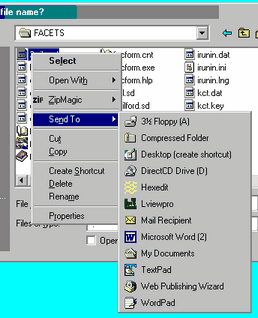
If NotePad is not in your SendTo list:
Add functionality to the Send To menu by copying short-cuts into c:\windows\sendto (or the equivalent in your version of Windows) - a useful program to add is NotePad.
To do this:
Start
Find
Files or Folders
Named: NotePad in C:
when NotePad.exe appears, Right-click on it.
Send To: Desktop: Create shortcut
Exit from Find
On Desktop:
My Computer
Click on words "My Computer" to highlight them, and type:
C:\windows\sendto
The "SendTo" folder displays
Drag NotePad shortcut from Desktop into SendTo folder.
NotePad is now in the Send To menu.
