Once Facets has the needed information, it proceeds with constructing measures:
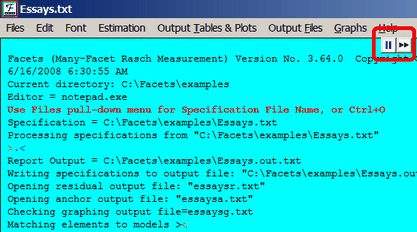
The first part reports which files are being read and written.
 are the quick-action buttons.
>........< is the iteration bar which indicates progress in processing the specification file.
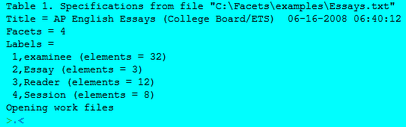
Table 1 summarizes key aspects of the specifications.
How many facets? - The number of different facets that combine together to produce the observations.
How many elements? - The number of different elements found in each facet.
Compare these numbers with what you expect in order to verify that the specifications are correct.
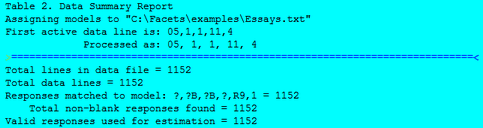
Table 2 reports on the data. Here there are 1152 observations, and all have been matched to the specified labels and the specified measurement model.
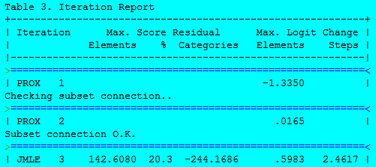
Table 3 reports on the estimation of measures. The first estimation method used is PROX, the Normal Approximation algorithm, see "Rating Scale Analysis". The important consideration is that the "max.=" amount gets closer to zero.
At the same time, the data is checked for connectedness. Here "Subset connection O.K." is reported, so there is complete connectedness. If there is not, see Connectedness.
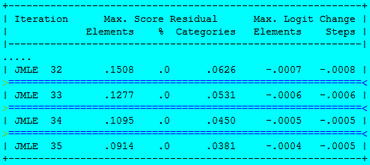
Estimation continues iteratively with JMLE, "joint maximum likelihood estimation", also known as UCON , "unconditional maximum likelihood", algorithm. This includes the Facets implementation of PMLE. "max. = .0914" at the bottom of this Figure means that the worst estimated measure predicts a raw score only .09 score points away from that observed. "max = -.0004" means that the biggest change in an estimate during this iteration is only .0004 logits. Since logits are only reported to 2 decimal places, this change is really meaningless. In this analysis, the convergence criteria appear to have been set more tightly than necessary, (but this is typical with high stakes examinations.) See also "My analysis does not converge."
When the convergence criteria are satisfied, estimation ceases. Or, to stop estimation more quickly, press Ctrl+F or select "Finish Iterating" on the Files pull-down menu.

