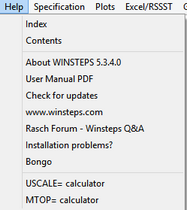
Index |
displays the Index of control variables in the Help file |
|
Contents |
displays the Table of Contents of the Help file. |
|
About WINSTEPS |
displays Winsteps version number and compile date. Please mention these when reporting problems. |
|
User Manual PDF |
displays the Winsteps Help file as a printable User Manual PDF. |
|
Download latest User Manual PDF |
shows webpage www.winsteps.com/manuals.htm |
|
Check for updates |
shows webpage of Winsteps updates on www.winsteps.com/wingood.htm |
|
www.winsteps.com |
takes you to our website: www.winsteps.com |
|
Rasch Forum - Winsteps Q&A |
takes you to the Rasch Forum website: raschforum.boards.net |
|
Installation problems? |
shows webpage of Winsteps installation problems and solutions on www.winsteps.com/problems.htm |
|
Bongo |
is the Winsteps "Adjutant's Bugle Call" - play this when you are summoning the data in preparation for constructing measures! |
|
helps you linearly rescale your measures in the way most meaningful for your audience: |
||

USCALE= Calculator
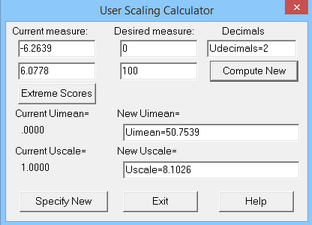
Under Current measure: enter two measures from your current analysis.
Under Desired measure: enter the values with which you want them to be reported.
Under Decimals: enter the number of decimal places for the measure Tables, Udecimals=.
Press Compute New to calculate the revised values of Uimean= and Uscale=.
The current values of Uimean= and Uscale= are displayed and also the revised New values. The New values can be altered if you wish.
Press Extreme Scores to place the measures for the minimum possible and maximum possible scores on the current set of items into the Current Measure boxes.
Press Specify New to action the New values. Or the values can be copied (Ctrl+c) and pasted into your Winsteps control file.
Also clicking on "Output Files", "Control Variable List" produces the full list of control variables including the new values of UIMEAN= and USCALE=
Example: We want the mean and S.D. of our sample to be 0 and 1.
Current Table 3.1
---------------------------------------
| RAW
| SCORE COUNT MEASURE
|--------------------------------------
| MEAN 31.7 25.0 .97
| S.D. 8.7 .0 1.35
The current mean = .97
The current mean + 1 S.D. = .97 +1.35
The desired mean = 0
The desired mean + 1 S.D. = 0+1
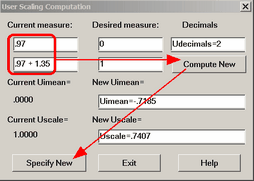
New Table 3.1
---------------------------------------
| RAW
| SCORE COUNT MEASURE
|--------------------------------------
| MEAN 31.7 25.0 .00
| S.D. 8.7 .0 1.00
Example: If I use IAFILE= and SAFILE= for some items, how do I rescale the analysis to set the reported person measure range as 0-100?
1. Do your analysis with IAFILE= and SAFILE=. USCALE= in this analysis is the value of USCALE= in the analysis that output the SAFILE=
2. Output Tables menu: Table 20.1. Identify the measure you want tobe 0, and the measure you want to be 100
3. Help menu: Scaling calculator
"Current Measure:" are the two measures from Table 20.1
"Desired Measure:" are the two measures you want
Click on "Compute New:" write down the value of Uscale= for your next analysis
Click on "Specifiy New"
4. Output Tables menu: Table 20.1. The range should be 0-100.
5. Output IFILE=if.txt, SFILE=sf.txt
6. Do the analysis again: IAFILE=if.txt, SAFILE=sf.txt and USCALE= the value of Uscale= from 3.
7. Output Tables menu: Table 20.1. The range should be 0-100.
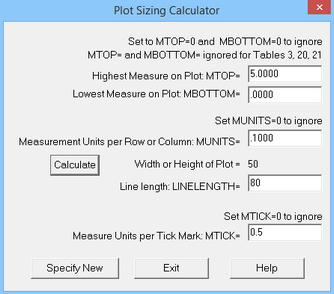
On Calculator: |
Action for Tables 1, 12, 16 Set value to 0 to ignore the command. |
Highest measure on Plot MTOP= |
Sets MTOP= |
Lowest measure on Plot MBOTTOM= |
Sets MBOTTOM= |
Measurement Units per Row or Column: MUNITS= |
Sets MUNITS= also for Table 2 and similar Tables. Example: MUNITS=0.1 for 10 rows or columns for 1 logit or USCALE= unit. |
Line length: LINELENGTH= |
Sets LINELENGTH=. Make this long enough for the width of the plot. |
Measure Units per Tick Mark MTICK= |
Sets MTICK=. Example: MTICK=0.5 place a tick mark every 0.5 measurement units (logits) on the plot |
Calculate button |
Calculates how many rows for MTOP=, MBOTTOM= and MUNITS= |
Width or Height of Plot |
Using the values in the calculator, reports the current height or width of the plot part of Tables 1, Table 2, etc. Set LINELENGTH= at least 20 more than this value. |
Specify New |
the values are actioned and the calculator exits |
Exit |
the values are not actions and the calculator exits |
Help |
shows this page |
